Skip to content

SaaS social media marketing works when your feed teaches the product the way a good demo does. This guide is for founders and lean marketing teams at SaaS companies. We show you how to pick platforms, plan content, add paid social, and measure pipeline, so social earns its budget.
What is SaaS social media marketing?
SaaS social media marketing is the use of social platforms to educate buyers, earn trust across a buying group, and move prospects toward a demo or trial. It also supports onboarding and retention after the sale.
In short, it is a channel for teaching, proof, and relationships. It is not a billboard for feature announcements. The work spans organic posts, paid campaigns, community replies, and the reporting that ties them to revenue.
How SaaS social differs from other social media marketing
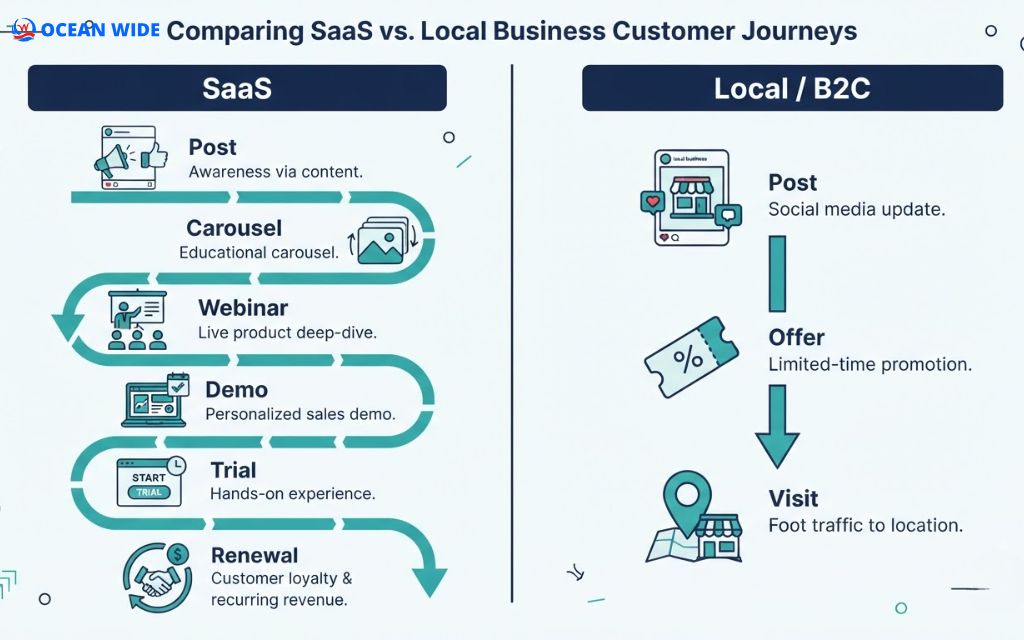
A restaurant wants a visit tonight. A SaaS company wants a demo next quarter and a renewal next year. That gap changes the goals, the content, and the metrics.
The table below compares the two models side by side.
| Factor | SaaS social media | Local or B2C social media |
| Sales cycle | Weeks to months | Minutes to days |
| Who decides | A buying group (user, manager, finance, IT) | One person or a household |
| Main goal | Demo, trial, signup | Visit, call, purchase |
| Core content | Education, product walkthroughs, proof | Offers, visuals, events |
| After the sale | Onboarding, adoption, renewal | Repeat visits, reviews |
Why social media matters for SaaS companies
Social media matters because SaaS buyers form opinions long before they talk to sales. The channel lets you reach every person in a buying group, stay visible across a long cycle, and keep customers engaged after signup.
Buyers research long before they book a demo
In Gartner’s survey of 750 B2B buyers, we noticed one number that reshapes the whole channel plan. Buyers spend about 17% of their buying time meeting potential suppliers. With three vendors on the shortlist, each one gets roughly 5%.
The rest goes to independent research and internal talks. Your posts, your founder’s comments, and your customer stories fill that gap.
Social builds trust across the buying committee
A champion, a finance lead, and a technical evaluator all look at your brand from different angles. One account can serve all three with different posts: a feature walkthrough, an ROI story, and an integration explainer.

Social supports onboarding and retention
Recurring revenue depends on renewals. Short tutorials, tips, and quick replies to comments help users reach value faster. When customers see a team that answers in public, they trust that support will show up when they need it.
Social also feeds other channels. Posts that earn engagement send branded searches to Google, and public LinkedIn posts and YouTube videos can surface in search results. A strong feed makes your SEO, email, and webinar programs work harder.
B2B vs. PLG and prosumer SaaS: which platforms fit your product?
The right platform depends on who buys your product and how they buy it. Sales-led B2B SaaS lives on LinkedIn. Self-serve and prosumer tools often grow faster on YouTube, Instagram, or TikTok.
Use this matrix as a starting point.
| SaaS model | Primary platforms | Secondary platforms | Main content job |
| Sales-led B2B (demo first) | YouTube, Reddit | Thought leadership, proof, demos | |
| PLG self-serve (trial first) | LinkedIn, YouTube | X, Reddit | Tutorials, use cases, changelogs |
| Prosumer or SMB SaaS | YouTube, Instagram, TikTok | LinkedIn, Facebook | Quick wins, templates, before/after |
| Developer tools | X, Reddit, YouTube | Technical threads, build logs |
LinkedIn: the default for B2B SaaS
LinkedIn reports more than 1.3 billion members and over 290 million in North America. It is where job titles, companies, and buying groups live. Company pages give you credibility; personal profiles of founders and staff give you reach.
YouTube: demos, tutorials, and searchable video
YouTube turns product walkthroughs into assets that keep getting found through search. A three-minute “how to” video can serve prospects, new users, and your support team at once.

X and Reddit: communities, changelogs, and technical buyers
X works for release notes, quick takes, and threads that explain one feature in order. Reddit rewards honest answers inside niche subreddits and punishes self-promotion. Read each community’s rules before you post a link.
Instagram, TikTok, and Facebook: when prosumer and SMB SaaS should use them
These networks fit tools that individuals or small business owners buy on their own, such as design, scheduling, or bookkeeping apps. Short videos that show a quick win in under 30 seconds perform best here. For sales-led B2B products, they are usually a side channel.

How to build a SaaS social media strategy in 7 steps
A SaaS social media strategy connects business goals to platforms, content, and metrics. The seven steps below follow the process we use when we plan social programs for startups and small businesses.
Step 1: Tie social goals to the funnel
Set one goal for each stage: awareness, demo or trial, and retention. “Grow followers” is not a goal. “Get 20 demo requests a month from LinkedIn” is. Write each goal with a number, a platform, and a deadline so you can judge it at day 90.
Step 2: Define your ICP and buying committee
Write down your ideal customer profile: company size, industry, and the problem you solve. Then list each role in the buying group and the question each one asks before saying yes. Every post you plan should answer one of those questions.

Step 3: Audit your profiles and competitors
Check that your bio states what you do and for whom. Then review three competitors: their platforms, formats, posting frequency, and what earns comments. Look for the topics they skip. Those gaps are your fastest path to a distinct voice.
Step 4: Choose one or two primary platforms
Small teams spread thin lose. We recommend one primary platform and one supporting platform for the first 90 days. Add a third only when the first two run on schedule. Consistency on one network beats silence on four.

Step 5: Set three to five content pillars
Content pillars are the themes you return to every week. A common SaaS mix: product education, customer proof, category point of view, team and culture, and industry news. Pillars keep the message coherent when one stakeholder sees your brand a dozen times across a long cycle.
Step 6: Build a realistic cadence and calendar
Plan only what your team can sustain. For a team of one to three people, two to three founder posts and two brand posts a week is a solid start. Batch the work: one planning session, one production day, then schedule.

Step 7: Layer paid social on top of organic
Organic posts show what resonates. Paid social puts the winners in front of the exact roles and accounts you want. Start with retargeting website visitors, then test cold audiences. Keep the first budget small and fixed until you know your cost per qualified lead.
Turn your product into content: where SaaS social posts come from
The best SaaS posts already exist inside your company. Changelogs, sales calls, and support tickets hold the questions buyers ask every day. Your job is to reshape them for the feed.
Collect the raw material in one shared folder. Ask sales to drop the top objections each week, ask support for the most repeated tickets, and save every release note. One recorded customer call can supply a month of posts.
Here is a repurposing map you can adapt.
| Source asset | Post format | Funnel stage |
| Changelog or release note | One feature, why it exists, who it helps (short video or post) | Consideration, retention |
| Objection from a demo call | Myth-bust post or carousel that answers it | Consideration |
| Support ticket or help doc | “How to” carousel or 60-second tutorial | Adoption |
| Customer interview | Before/after story with result on slide one | Decision |
| Webinar recording | Three to five short clips plus a recap carousel | Awareness |
| Blog post | Thread or carousel built from its H2s | Awareness |
If three prospects asked the same question on demo calls this month, your feed should have answered it last month.

Founder-led and employee-led social for SaaS
People follow people more than logos. A company page only reaches its followers. Founders, product leads, and engineers reach their own networks, and their posts read as expertise, not ads.
Looking at the Edelman–LinkedIn research, we found two numbers worth keeping in mind:
- In the 2024 report, 73% of B2B decision-makers said thought leadership is a more trustworthy basis for judging a company than its marketing materials.
- In the 2020 study, 88% said thought leadership improves their view of an organization, yet only 17% rated most of what they read as very good or excellent.
The bar is low, and the payoff is real. Do not force every employee to post. Give sharers, commenters, and writers each a simple role. Writers publish original posts, commenters add value on industry threads, and sharers repost company content with one line of their own view. That structure keeps the program alive after the first month.

Paid social for SaaS: LinkedIn Ads vs. Meta Ads
Paid social helps SaaS teams reach exact roles fast and bring back visitors who did not convert. LinkedIn and Meta solve different jobs, so most teams test both before they scale one.
| Factor | LinkedIn Ads | Meta Ads (Facebook, Instagram) |
| Targeting strength | Job title, seniority, company size, industry | Interests, behaviors, custom and lookalike audiences |
| Best for | Sales-led B2B, account lists | Prosumer and SMB SaaS, retargeting |
| Useful formats | Lead gen forms, document ads, thought leader ads | Short video, carousel, lead forms |
| Typical role | Reach the buying committee | Lower-cost reach and retargeting |
When we run digital advertising campaigns, we set up conversion tracking first. Without it, the platform optimizes for clicks, not qualified leads.
Retargeting is the safest first test. People who visited your pricing page or watched half of a demo video already know you. Show them a customer story or a trial offer, and cap how often each person sees the ad to avoid fatigue.

SaaS social media content ideas that educate and convert
Good SaaS content teaches one thing per post. Pick ideas that match your pillars and the funnel stage you need to fill. These ideas work across LinkedIn, YouTube, and Instagram:
1. Workflow walkthrough carousel: one job in your product, step by step.
2. Demo objection post: the question prospects ask most, answered plainly.
3. Before/after customer story: the result first, then how they got there.
4. Changelog explained: what shipped, why, and who it helps.
5. Behind-the-build post: a decision your team argued about and why you chose it.
6. Webinar clip: one sharp insight in under 60 seconds.
7. Poll: ask about a pain point, then post the answers as a follow-up.
8. Myth-bust: a common belief in your category and what the data says.
Carousel slides are often designed at 1,080 × 1,350 pixels. For LinkedIn document posts, a letter-size PDF page (8.5 × 11 in / 21.6 × 27.9 cm) also reads well on desktop.

Turn social engagement into demos and trials
A post earns attention. A landing page turns that attention into a demo or trial. Many SaaS teams send social traffic to a busy homepage and lose it there.
Build the path with these pieces:
- One landing page per campaign that matches the post’s promise and has one call to action.
- A mobile-first layout, since many social clicks come from phones.
- UTM parameters on every link so your analytics show which post drove the visit.
- A pinned post or link hub on each profile that points to your demo or trial page.
Our website design team builds these pages alongside social campaigns, so the message stays consistent from post to signup.

How to measure SaaS social media ROI
Measure SaaS social media by its effect on the pipeline, not by likes. Track one or two metrics per funnel stage and review them monthly.
Tag every link with UTM parameters, for example utm_source=linkedin&utm_medium=social&utm_campaign=q4-demo. Then connect form submissions to your CRM, so each demo carries its source into the pipeline report.
| Funnel stage | Metrics to track |
| Awareness | Reach, impressions, follower growth among your ICP |
| Engagement | Engagement rate, comments, saves, shares |
| Conversion | Click-through rate, landing page conversion rate, demo requests, trial signups |
| Pipeline | MQLs and SQLs from social, pipeline influenced, cost per lead |
| Retention | Support response time, community activity, churn trends |
Social often influences deals that attribution tools miss. Add a “How did you hear about us?” field to your demo form. Founders’ posts and peer shares in private chats show up there long before they show up in analytics.

Best social media management tools for SaaS teams
The right tool depends on team size, platforms, and how closely you need to tie social to your CRM. Check each vendor’s current plans before you buy, since features and pricing change.
| Tool | Best fit | Notable strength |
| Buffer | Solo founders, small teams | Simple scheduling and analytics |
| Hootsuite | Growing teams on many networks | Scheduling, inbox, listening |
| Sprout Social | Mid-size teams that need reporting | Analytics, listening, employee advocacy add-ons |
| HubSpot (social tool) | Teams already on HubSpot CRM | Ties social activity to contacts and deals |
| Later | Visual, Instagram-heavy brands | Visual planner and link-in-bio |
| Oktopost | B2B teams with employee advocacy programs | Advocacy and CRM integrations |
Before you choose, confirm three things: the tool posts to personal LinkedIn profiles if your founder posts, it supports an approval step if several people draft content, and it exports data your CRM can read.

Common SaaS social media mistakes to avoid
Most SaaS feeds fail for the same few reasons. Watch for these:
- Feature dumps: A list of updates is a changelog, not a post.
- The corporate “we”: “We are thrilled to announce” sounds like every other vendor. Name the person and the problem.
- Being everywhere at once: Five half-run accounts lose to one active account.
- Vanity metrics: Likes without demos do not pay for the program.
- Posting only at launch: Empty weeks after a launch tell buyers the team moved on.
- Ignoring comments and DMs: A slow reply in public costs more than no post.
- Self-promotion in communities: Dropping links in Reddit threads or Slack groups gets posts removed and accounts banned.

A 90-day SaaS social media plan for small teams
A 90-day plan gives a lean team structure without locking it in. Here is the plan we suggest for a team of one to three people.
| Period | Focus | Key actions |
| Days 1–30 | Foundation | Audit profiles, define ICP and pillars, fix bios and pinned posts, build a repurposing list |
| Days 31–60 | Consistency | Post on schedule, launch founder posts, publish two short videos, test one retargeting campaign |
| Days 61–90 | Optimization | Review metrics by stage, double down on top formats, add a landing page test, report pipeline influenced |
At day 90, keep what drove demos and cut what only drove likes. Then write the next 90-day plan with targets based on your own numbers, not industry averages.

In-house, freelancer, or agency: who should run your SaaS social media?
Who runs your social program depends on your stage, budget, and how much creative work you need. Each option has trade-offs.
| Option | Strengths | Limits | Best for |
| In-house hire | Deep product knowledge, fast access to the team | One person rarely covers strategy, design, video, and ads | Teams with steady volume and budget for a full role |
| Freelancer | Flexible cost, specialist skills | Limited capacity, gaps when they are busy | One channel or one task, such as LinkedIn ghostwriting |
| Agency | Strategy, creative, ads, and reporting under one roof | Needs onboarding time to learn your product | Teams that need a full program without hiring three roles |
A hybrid model often works well. Your founder owns the voice and topics, while an agency handles design, video, scheduling, ads, and reporting. Ask any partner how they will learn your product, who writes the posts, and which metrics they report each month.

The Ocean Wide Social Marketing Service for SaaS and tech startups
The Ocean Wide is a digital marketing agency with strategists, designers, and developers in the US and Vietnam. For SaaS social media marketing, our Social Marketing Service covers the full program a lean SaaS team needs:
- Strategy: audience research, competitor analysis, platform selection, content pillars, and a KPI roadmap.
- Content creation: carousels, graphics, short-form video, and brand voice.
- Management: scheduling, comment and DM replies, and community engagement.
- Paid social: LinkedIn, Facebook, Instagram, and TikTok ads.
- Analytics: reporting tied to the goals we set together.
We work in five phases: discovery, strategy, content and campaign setup, launch and optimization, and reporting. As of October 2026, our Social Marketing plan starts at $999 per month, with month-to-month terms.
Every engagement starts with discovery, where we learn your product, buyers, and sales cycle. Good SaaS content needs that context.

Frequently asked questions about SaaS social media marketing
Which social media platform is best for B2B SaaS?
LinkedIn is the best starting point for most B2B SaaS companies because it lets you reach people by role and company. Add YouTube for demos and tutorials.
Should the founder or the company page post on LinkedIn?
Both. The founder builds trust and reach, and the company page gives buyers a place to verify you. Personal posts often reach further than brand posts.
How often should a SaaS company post on social media?
Post as often as you can sustain with quality. Two to three founder posts and two brand posts a week is a solid start for a small team.
Is paid social worth it for an early-stage SaaS company?
Yes, if you start small. Retarget website visitors first, then test one cold audience with a clear offer.
How long does SaaS social media marketing take to show results?
In our experience, organic social needs three to six months of steady posting to build traction. Paid campaigns can produce leads within weeks.
When should a SaaS company hire an agency for SaaS social media marketing?
Hire an agency when you need strategy, design, video, and ads at once, but cannot justify three hires. An agency also helps when your founder has the ideas but no time to produce and schedule posts.