Skip to content

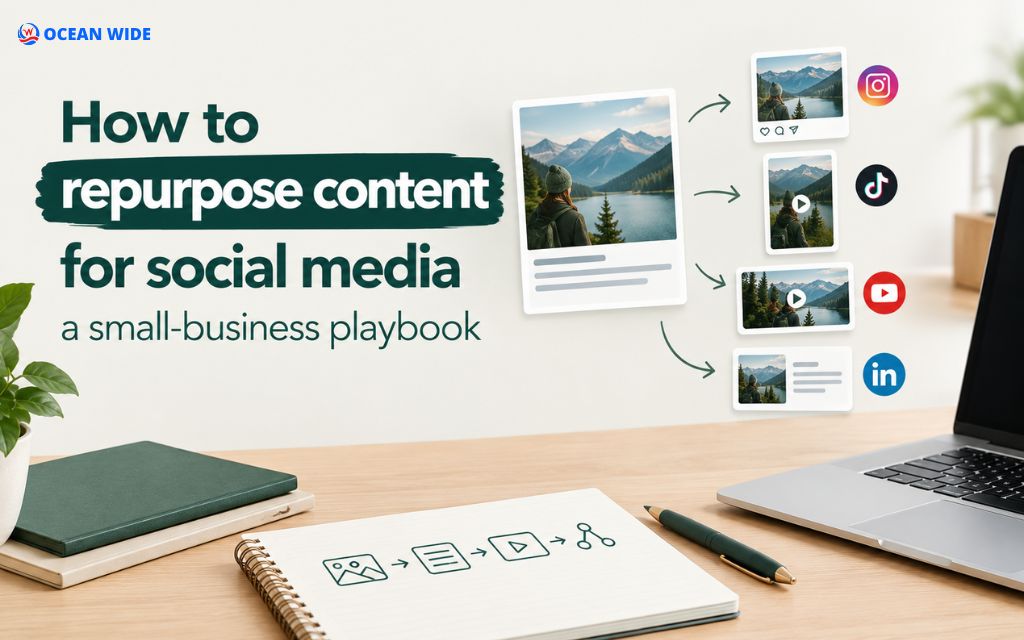
To repurpose content for social media, take one piece you already made, such as a blog post, video, or customer review, and rebuild it for each platform. This guide gives small business owners a 6-step process, a platform cheat sheet, and an example that turns 1 blog post into 10 posts.
What it means to repurpose content for social media
Repurposing content for social media means keeping the core idea of an existing asset and rebuilding it in the format each platform rewards, such as a carousel, a short vertical video, or a text post.
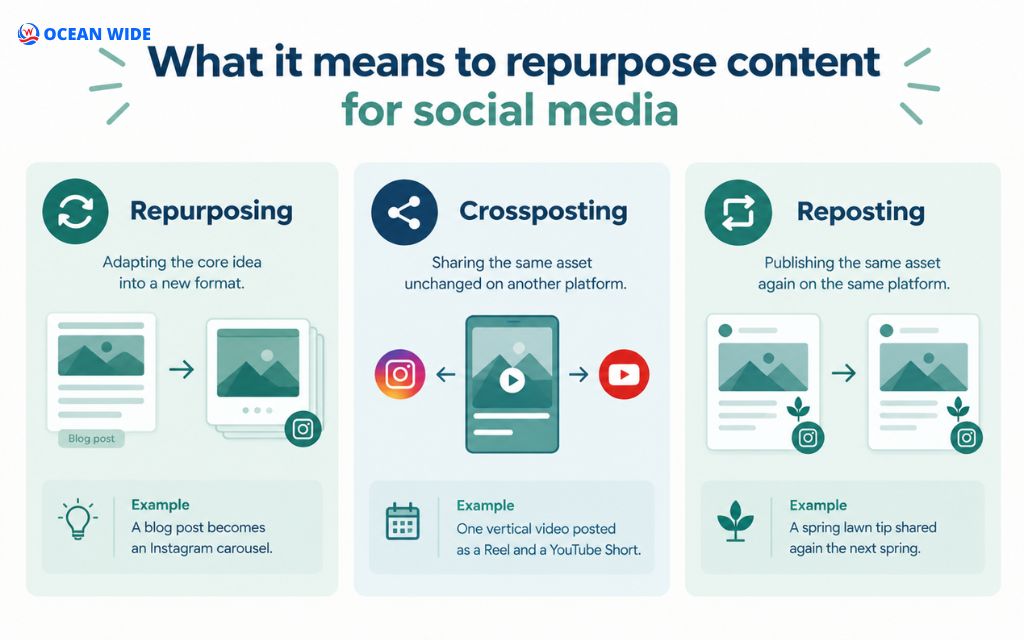
The idea stays the same, while the format, length, and opening line change. Small businesses mix 3 related tactics, and each solves a different problem:
| Tactic | What it is | When to use it | Example |
| Repurposing | Adapting the core idea into a new format | Reaching people who skip your original format | A blog post becomes an Instagram carousel |
| Crossposting | Sharing the same asset unchanged on another platform | Formats already match across apps | One vertical video posted as a Reel and a YouTube Short |
| Reposting | Publishing the same asset again on the same platform | A post performed well and is still accurate | A spring lawn tip shared again the next spring |
Most accounts need all 3. Crosspost when formats match, repost proven winners, and repurpose when a new audience expects a different shape of content.
Benefits of repurposing content and where it falls short
Repurposing content saves production time, reaches people on the channels they already use, and repeats your message often enough to stick. These 4 benefits matter most for small teams:
- Saves research time. The thinking, fact-checking, and approvals already happened, so each new post needs editing, not drafting.
- Extends reach. A customer who never reads blogs may still watch a 30-second Reel built from the same advice.
- Reinforces your message. One expert idea shown in several formats builds recall and trust over weeks.
- Steadies your posting rhythm. A backlog of source content keeps the calendar full during busy seasons.
Channel growth makes this pressing. According to Sprout Social’s 2026 Social Media Content Strategy Report, 87% of marketers plan to expand to more networks in 2026. Repurposing lets a small team keep pace without writing every post from scratch.
What repurposing won’t fix
Repurposing multiplies what already works, so a weak idea only becomes several weak posts. It also leaves 3 problems untouched: content with no clear audience, advice that is out of date, and a plan spread across more channels than your team can maintain.

Which content to repurpose first
Repurpose content that has already proved its value: pieces with steady traffic, strong engagement, or questions customers keep asking. Start with 1 source piece, not your whole archive.
Start with your proven performers
Check 3 data sources before you choose: Google Analytics 4 for blog pages with steady visits, Google Search Console for queries that bring impressions, and platform insights for posts with high saves, shares, and comments. Then match the metric to your goal:
- Awareness: Pick posts with the highest reach and shares.
- Engagement: Pick posts with the most comments and saves.
- Website traffic: Pick posts with the highest link click-through rate.
Choose evergreen over time-sensitive content
Evergreen content stays accurate for months or years, so it repurposes with light editing. A guide to caring for a new lawn or choosing a family lawyer fits that profile.
Time-sensitive content, such as a holiday menu or a product launch, needs repurposing within days. After that, it needs a dated refresh before it can travel again.

When to skip repurposing
Skip a piece when its facts are outdated, its topic no longer matches your services, or it underperformed on every channel. When we review a client’s content library, we sort each piece into 3 groups: repurpose now, refresh first, or retire.
How to repurpose content for social media in 6 steps
To repurpose content for social media, follow 6 steps: audit, choose channels, extract ideas, adapt formats, schedule, and measure. The sequence below works for a blog post, a video, or a webinar.
Step 1: Audit and pick one source piece
Choose 1 blog post, video, or webinar that meets the criteria above. Read it once and write its main promise to the reader in a single sentence. That sentence anchors every post you create from it.
Step 2: Choose 2 or 3 channels
Pick 2 or 3 platforms where your customers already spend time. A restaurant gains more from Instagram, Facebook, and its Google Business Profile than from X, while a law firm reaches referral partners on LinkedIn.
Buffer’s content team gives the same advice: master a few channels before adding more. Consistency on 2 platforms outperforms sporadic posting on 5, and it drives organic social media growth without an ad budget.

Step 3: Pull out the core ideas
Break the source into micro-content: small, standalone units that each make one point. Mark 5 elements as you read: hooks, steps, statistics, quotes, and visuals. A 1,500-word how-to post can yield 8 to 12 usable units.
Step 4: Rebuild each idea in the platform’s native format
Rewrite each unit for its destination. Change the opening line, the length, and the visual, but keep the facts intact.
A 6-step list becomes a 7-slide carousel with 1 cover slide. A sharp sentence becomes a branded quote graphic, and a how-to section becomes a 45-second vertical video script.
Write a new hook for every platform. On LinkedIn, lead with a specific outcome; on Instagram, lead with the visual; on TikTok and Shorts, show the result in the first 2 seconds.
Repurposing is editing, not copying. If a post makes sense only to someone who read the original article, it needs another pass.

Step 5: Schedule a 4-week repurposing calendar
Spread the pieces across 4 weeks so each one gets attention. A simple rhythm for 1 blog post looks like this:
- Week 1: Publish the blog post, a carousel summary, and a link post on Facebook or LinkedIn.
- Week 2: Post a short vertical video and a quote graphic.
- Week 3: Run a poll or question post, then answer it with a step from the article. This back-and-forth feeds your social media engagement strategy.
- Week 4: Share a Google Business Profile update and a customer-question post that links back.
Step 6: Track results with UTM links
Add UTM parameters to every link that points back to your website, so Google Analytics 4 shows which platform and format sent each visit. Tag the source (instagram), the medium (social), and the campaign (the article slug).
After 4 weeks, compare reach, engagement rate, link clicks, and form submissions by format. Repeat the formats that won, and drop the ones that didn’t.
Early numbers swing from post to post. Judge each format on at least 2 or 3 posts before you cut it.

Platform cheat sheet for repurposed content (October 2026)
Each platform rewards a different format, length, and tone. Use this table to decide how one idea should look on each channel:
| Platform | Best repurposed formats | Format notes | CTA style |
| Carousels, Reels, Stories | Carousels hold up to 20 photos or videos; 4:5 portrait images fill more of the feed; Reels use 9:16 vertical video | “Save this” or link in bio | |
| Link posts, short videos, photo albums | Link previews carry traffic straight to the blog post | Direct link | |
| Text posts, document carousels, short videos | Posts allow up to 3,000 characters; a 1-line hook shows before “see more” | Link in post or first comment | |
| YouTube Shorts | Clips from long videos, how-to scripts | Up to 3 minutes for square or vertical videos uploaded since October 15, 2024 | Link to the full video |
| TikTok | Quick tips, behind-the-scenes clips | 9:16 vertical video with on-screen text for muted viewers | Profile link |
| Infographics, step graphics | 2:3 vertical pins link straight to the article | Pin link | |
| X and Threads | Short tips, threads | Standard X posts cap at 280 characters | Link at thread end |
| Google Business Profile | Updates, offers, events | Posts archive after 6 months unless dated; a phone number in the text can trigger rejection | “Learn more” button |
Platform limits change often. Confirm current specs in each help center before you build templates.

Example: turning 1 blog post into 10 social posts
1 blog post can feed a month of social content when you map each idea to a format. This example scenario uses a hypothetical landscaping company and its blog post, “5 signs your lawn needs aeration.”
| # | Asset | Platform | Hook or angle |
| 1 | 7-slide carousel | Instagram, LinkedIn | “5 signs your lawn can’t breathe, and what to do this weekend” |
| 2 | 45-second video | Reels, Shorts, TikTok | The screwdriver test: if a 6-inch (15 cm) screwdriver won’t sink into moist soil, the soil is compacted |
| 3 | Quote graphic | Instagram, Facebook | The owner’s one-line rule on spring versus fall timing |
| 4 | Before-and-after photos | Facebook, Google Business Profile | The same lawn 3 weeks after aeration |
| 5 | Poll | Instagram Stories | “When did you last aerate your lawn?” |
| 6 | Infographic pin | All 5 signs at a glance | |
| 7 | Text post | What commercial property managers miss about turf health | |
| 8 | Profile update | Google Business Profile | Seasonal aeration openings with a “Learn more” button |
| 9 | Email snippet | Newsletter | The top 2 signs plus a link to the full post |
| 10 | Comment reply | Facebook groups, local forums | A direct answer to “Should I aerate in summer?” with the article link |
Every asset links back to the original post with UTM tags. The blog page keeps earning visits long after its first week.

How to repurpose old blog posts for social media
To repurpose old blog posts, refresh the facts first, then build social posts from the updated version. A social post that points to outdated advice costs you trust. Work through these 4 updates before you design anything:
- Update statistics, prices, screenshots, and platform names, such as Twitter to X.
- Add a “Last updated” date and fix broken links.
- Keep the same URL so the page keeps its search history, as HubSpot recommends for high-traffic posts.
- Pull 3 to 5 fresh hooks from the refreshed sections.
Once the refresh goes live, share a post that names what changed, such as new prices or an updated checklist. Returning readers then have a reason to click again.

Creative ways to repurpose content by format
The source format decides which social formats come easiest. Use these pairings for the 6 asset types most small businesses already own. When your archive runs thin, these social media post ideas give you new source material to repurpose later.
Blog posts and guides
Turn numbered steps into carousels, single tips into short videos, and data points into infographics. A FAQ section becomes a week of question-and-answer posts.
Videos, webinars, and livestreams
Cut a long video into 30- to 90-second clips, each built around one point. Add burned-in captions for viewers who scroll with sound off, then transcribe the recording to create a blog recap or newsletter.

Podcasts and interviews
Turn strong 20- to 40-second moments into audiograms and quote cards. Then write a 150-word recap post that links to the full episode.
Customer reviews, testimonials, and UGC
Reviews and user-generated content (UGC) make credible social proof, but ask permission first. Credit the customer’s handle, keep their words unedited, and remove personal details.

Photo and video shoots
Plan 1 shoot to feed several weeks of posts. When our team plans a shoot for a local client, we write a shot list that covers vertical clips for Reels, horizontal footage for YouTube, stills for carousels, and detail shots for the Google Business Profile.
Drone footage adds context for landscaping, real estate, and outdoor venues. FAA Part 107 rules cap most commercial drone flights at 400 feet (122 meters) above ground level.
Social media posts
Your best social posts can travel too. Turn a high-performing LinkedIn post into an Instagram carousel, a run of customer questions into a blog FAQ, or a top Reel into a newsletter tip.

Repurposing ideas for local and small businesses
Local businesses repurpose best when content answers the questions customers ask before they call. This approach sits at the core of hyperlocal social media marketing, which targets people inside your service area. Here are 4 industry examples:
- Restaurants: Film 1 dish from prep to plate, then cut it into a Reel, a menu-feature carousel, and a profile photo update.
- Landscaping companies: Turn a seasonal checklist post into a monthly carousel series and before-and-after posts from finished jobs.
- Home care providers: Turn a caregiver FAQ page into short answer videos and family-focused Facebook posts, with no client details.
- Law firms: Split a long legal guide into LinkedIn text posts, each answering one common client question.
Each example reuses work the business already does. The material comes from daily jobs, customer questions, and finished projects rather than a separate content budget.
Use your Google Business Profile posts
Google Business Profile posts appear on your profile in Search and Maps, so they reach people already looking for your business. Google supports 3 post types: updates, offers, and events.
Posts older than 6 months get archived unless you set a date range, and a phone number in the description can get a post rejected. Repurpose a blog tip as an update with a “Learn more” button pointing to the full article.

Using AI to repurpose content without losing your voice
AI speeds up the mechanical side of repurposing, while people keep the angle, accuracy, and brand voice. Split the work this way:
| AI handles | People handle |
| Pulling quotes and timestamps from transcripts | Choosing which idea deserves a post |
| Drafting first versions of captions and hooks | Checking every fact, number, and claim |
| Summarizing a long article into key points | Matching tone to your brand |
| Suggesting hashtags and alt text | Approving the final post |
Before you publish an AI draft, run a 4-point review:
- Confirm that every fact appears in the source content.
- Read the draft aloud to test whether it sounds like your team.
- Check the length and format against the platform’s specs.
- Add a UTM-tagged link back to the original page.
Google’s helpful content guidance encourages creators to explain how content was made when readers might wonder. A short note about AI assistance meets that expectation on longer blog recaps.

Does repurposing content hurt SEO?
No, repurposing content for social media doesn’t hurt SEO, because social posts live on other platforms and point back to your page.
Google’s guide to ranking systems describes deduplication: when pages are near-identical, Google shows the most relevant one instead of all of them. That filtering is not a penalty.
The risk appears when you repurpose into new pages on your own site. Two blog posts that target the same search intent compete with each other, a problem called keyword cannibalization. Give each new page its own angle and keyword, or update the original instead.
For articles republished on other websites, Google advises against relying on canonical tags. Ask those partners to block indexing of their copy.

Common repurposing mistakes to avoid
6 mistakes undo most repurposing effort:
- Copying the same caption to every platform ignores what each audience expects.
- Repurposing weak content spreads a poor result across more channels.
- Ignoring format specs crops images and cuts off text.
- Forgetting a link back loses traffic the original page needs.
- Spreading across too many channels drains the time you need for consistency.
- Skipping captions and alt text shuts out viewers who watch muted or use screen readers.

Tools that make repurposing easier
5 tool categories cover most repurposing work. Pick 1 tool from each category you need, not a full stack:
- Design tools: such as Canva, Adobe Express, and Figma, for carousels, quote cards, and infographics.
- Video editors: such as CapCut, Descript, and Adobe Premiere Pro, for clipping and captions.
- Transcription tools: such as Otter.ai, Descript, and YouTube auto-captions, for turning audio into text.
- Scheduling platforms: such as Buffer, Meta Business Suite, and Hootsuite, for running the 4-week calendar.
- AI assistants: such as ChatGPT, Claude, and Gemini, for first drafts and summaries.
Start with the free plan of each tool, and upgrade only when a task repeats every week.

Get hands-on help from The Ocean Wide social marketing service
To repurpose content for social media every week, a small team needs time for planning, design, filming, writing, and reporting. When that time runs short, The Ocean Wide’s Social Marketing Service handles the full cycle for you.
Since 2019, our Denver team of strategists, designers, and videographers has worked with local businesses, such as restaurants, landscaping companies, and home care providers. We cover 4 areas:
- Content planning: We audit your existing content and build a monthly repurposing calendar.
- Graphic design: Our designers create on-brand carousels, quote cards, and infographics.
- Photo and video production: We shoot and edit footage, including drone video, sized for each platform.
- Reporting: We track UTM-tagged links and report which formats bring visits and leads.
See finished work for local clients in our portfolio, or contact The Ocean Wide to plan your first month of repurposed posts.

Frequently asked questions about repurposing content
What is the 5-to-1 rule for repurposing content?
The 5-to-1 rule means creating at least 5 social posts from every long-form piece. Buffer popularized the guideline; treat it as a minimum, not a fixed quota.
How often can I repost the same content?
Repost an evergreen post only after several weeks, and change the hook or visual each time. Followers then see a fresh angle instead of a repeat.
What is the difference between repurposing and crossposting?
Crossposting shares the same asset unchanged on another platform; repurposing rebuilds the idea in a new format. Use crossposting when formats match and repurposing when they don’t.
What are the benefits of repurposing content?
Repurposing saves production time, extends reach, reinforces your message, and keeps your schedule steady. It works best on content that has already performed.
Can I repurpose customer reviews on social media?
Yes, with the customer’s permission. Credit them, keep their words intact, and remove personal details.
Does repurposed content count as duplicate content?
No, not when it lives on social platforms or takes a new format. Duplicate-content filtering applies to near-identical web pages.
What is the easiest way for a small business to repurpose content for social media?
Start with how-to blog posts, customer FAQs, and project photos, because each one holds several standalone tips or visuals. A single how-to post can supply a carousel, a short video, and a poll in the same week.