Skip to content

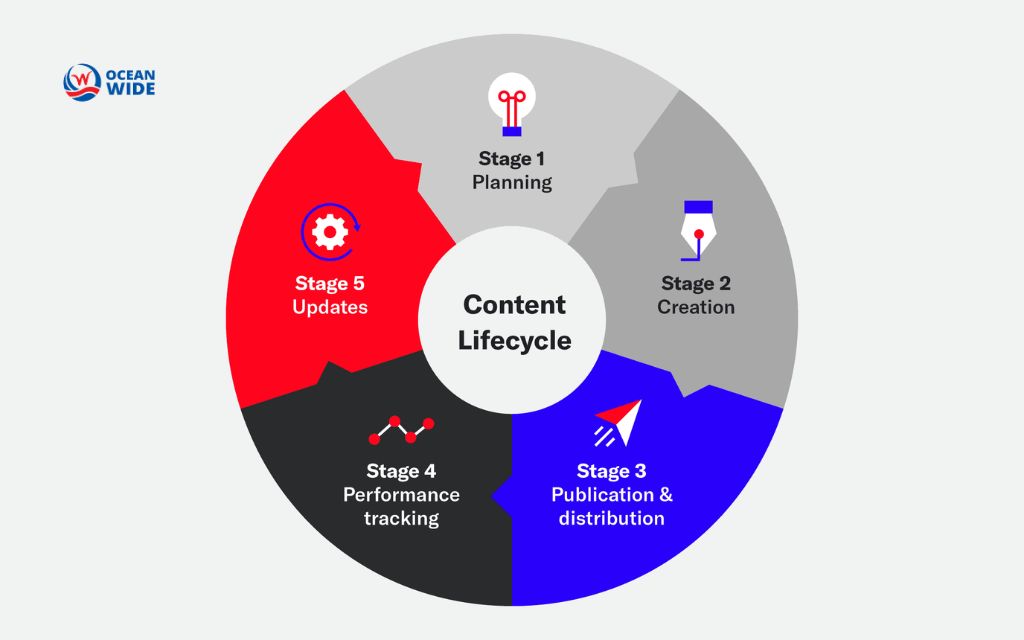
Every piece of content, from a blog post to a product page, moves through a content lifecycle: planning, creation, review, publication, distribution, measurement, and eventual retirement or reuse. Marketing teams that manage this process well keep their content accurate, relevant, and easy to find. Teams that ignore it end up with outdated pages, duplicate topics, and content that quietly stops working. This guide breaks down each stage of the content lifecycle and shows how to build a practical, repeatable system for managing content long after it goes live.
What is the content lifecycle
The content lifecycle describes the full path a piece of content takes, from the first idea to the point it gets updated, repurposed, or removed. Every article, video, landing page, and social post follows this same basic path, even when the timeline and effort differ by format. You may also see it written as content life cycle or web content lifecycle, but all three refer to the same underlying process.
Content lifecycle management is the practice of actively directing that path. Where the content lifecycle is simply what happens to a piece of content over time, content lifecycle management is the set of decisions, workflows, and checkpoints a team puts in place to control it.
Content governance sits one level above that. Governance defines the rules, ownership, and standards that apply across the entire content library, not just one asset. The content management system, or CMS, is the software that stores and publishes content. It supports the lifecycle but does not manage it on its own. Confusing these four terms is common, and it is one reason content operations break down. Clear content moves through a lifecycle. Well-run teams manage that lifecycle on purpose.
Why the content lifecycle matters
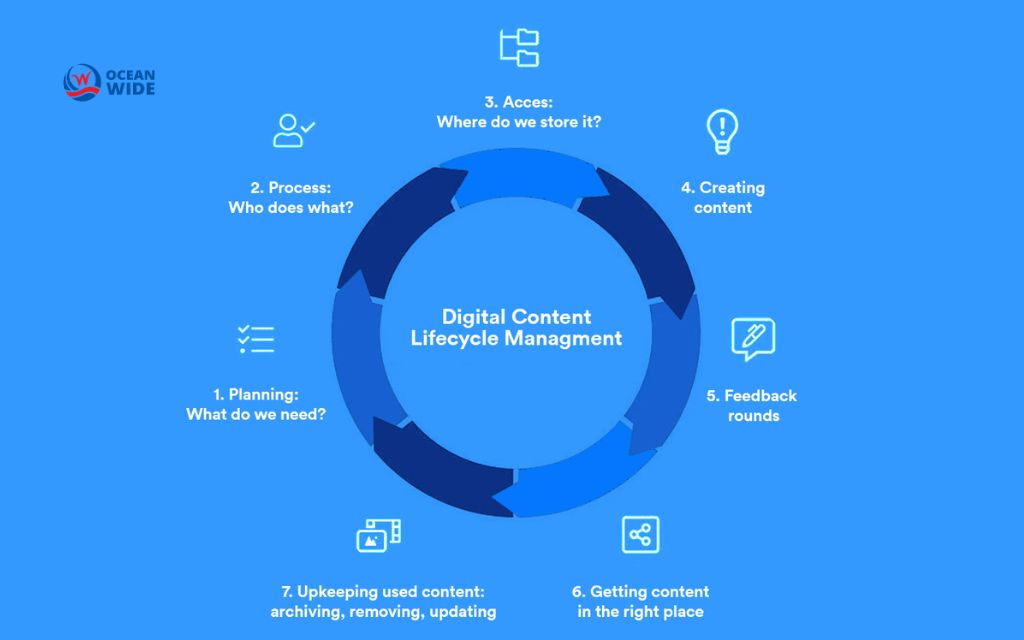
Content teams that manage the lifecycle deliberately see fewer stale pages, tighter editorial consistency, and stronger organic performance over time. Search engines reward content that stays accurate and current, so a page left untouched for years tends to lose ranking even if nothing about it was ever wrong. This gradual decline is often called content decay, and it happens quietly. Traffic drops a little each month until the page barely registers, and by the time someone notices, the fix costs far more than a scheduled review would have.
Lifecycle management also protects compliance. Product claims change, pricing changes, regulations change, and content that references any of these needs a clear owner who checks it on a schedule.
Beyond search performance and compliance, a managed lifecycle keeps content marketing lifecycle work efficient. Instead of writing every piece from scratch, teams can update, repurpose, or consolidate what already exists, which lowers production cost and speeds up the path from idea to publish. The end result touches nearly every outcome a marketing team tracks: content quality, consistency, efficiency, search visibility, and return on investment.
Planning and strategy
Planning is where the content lifecycle begins, and it decides more about a piece of content’s eventual performance than any other stage. Before anyone writes a word, the team needs to answer a few questions: who is this for, what should it achieve, and how will success get measured. Skipping this step is the fastest way to end up with content that reads well but serves no clear purpose.
Good planning also assigns ownership early. Someone needs to own the topic, someone needs to own the deadline, and someone needs to own the decision to publish. Without that clarity, content stalls in review or gets published without the right eyes on it. Keyword research, competitor review, and a quick audit of existing content on the same topic all belong here too, since duplicating a page that already exists wastes the exact resources planning is supposed to protect.

Creation and review
Creating the draft
Creation turns the plan into an actual asset: copy, video, design, or some mix of formats. Writers and designers should work from the brief set in planning, not from a blank page, since chasing a moving target slows down every later stage. Research, outlining, drafting, and internal collaboration all happen here, and for text content this stage benefits from a clear structure decided before the writing starts rather than after.
Teams that treat creation as a solo task tend to produce content that misses context only other departments have, like a support team’s view of common customer questions or a sales team’s sense of what actually closes a deal. Looping in those perspectives during creation, not after, saves a full round of rewrites later.
Review and approval workflow
Review is a distinct stage of the content lifecycle, not a quick pass before hitting publish. This structured review checks accuracy, tone, brand consistency, and, where relevant, legal or compliance sign-off. Content that touches pricing, health claims, financial guidance, or regulated topics needs a compliance check built into the workflow, not bolted on at the end.
Approval should have one clear owner with the authority to say yes. When approval is spread across too many people, content either stalls indefinitely or ships with no one truly accountable for it. One simple rule helps here: one person plans the content, one person creates it, and one person approves it, even if all three roles sometimes belong to the same individual on a small team.

Publication and distribution
Publishing content
Publishing is the moment content becomes visible to its audience, whether that means pushing a blog post live, sending an email, or posting to social media. Technical basics matter here: correct metadata, working links, proper formatting on mobile, and a URL structure that will hold up over time. Rushing the publish step creates cleanup work later, since fixing a broken link or a missing meta description after the fact takes longer than getting it right once.
Publishing should also follow a schedule tied back to the plan, not an ad hoc decision made whenever a draft happens to be ready. Consistent timing builds audience expectation and gives distribution channels, especially email and social, a predictable rhythm to work with.
Choosing distribution channels
Distribution decides who actually sees the content once it exists. Website traffic, organic search, email lists, social channels, and paid promotion each reach a different slice of the audience, and most content benefits from more than one. Matching content type to channel matters: a detailed guide performs differently on a company blog than it does as a short social post, so distribution often means adapting the same idea into multiple formats rather than posting one link everywhere.
Owned channels, like the website and email list, deserve first priority since the business controls them directly. Paid and earned channels extend reach but depend on factors outside the team’s control, so they work best as a layer on top of a strong owned-channel foundation.

Measurement and optimization
Tracking performance by stage
Measurement should not wait until a piece of content is failing. Early performance signals, like initial traffic, time on page, and click-through rate from search results, tell a team quickly whether a piece is on track. Later signals, like ranking position, conversion rate, and backlinks earned, show whether the content is compounding in value or flattening out.
Different stages call for different metrics. Newly published pages should get tracked weekly for the first month, then monthly after that. Older content only needs a periodic check, often quarterly, unless something changes in the market or the page starts losing ranking.
Recognizing and fixing content decay
Content decay shows up as a slow, steady drop in traffic or ranking for a page that used to perform well. Common causes include outdated statistics, changed product details, newer competing pages that now answer the search intent better, or simply a search algorithm update that favors fresher content. Catching decay early, through scheduled tracking rather than waiting for a steep drop, keeps the fix small.
Fixing decayed content usually means updating facts and examples, tightening the structure, adding sections the page is missing compared to newer top-ranking pages, and refreshing the publish date once real changes have been made. Republishing without actually improving the content rarely helps and can even hurt trust with returning readers.

Repurposing, archiving, and retirement
Repurposing existing content
Repurposing turns one piece of content into several, stretching the original research and writing investment further. One long guide can become a series of social posts, an email sequence, or a short video script, and a strong-performing blog post can anchor a downloadable resource. This stage of the content lifecycle often gets skipped, even though it usually costs less than creating something new from a blank page.
The best candidates for repurposing are pieces that already perform well but reach only one channel or format. Repurposing them extends that existing performance into new audiences instead of asking brand-new content to prove itself from zero.
Archiving vs. retiring content
Archiving and retiring are not the same decision, even though both mean a page stops being actively promoted. Archived content stays live but moves out of active promotion, useful for reference material, past campaigns, or seasonal content that will matter again later. Retired content gets removed entirely, usually because it is outdated, inaccurate, or no longer relevant to the business.
When retiring a page, redirect its URL to the closest relevant live page instead of leaving it to return a broken link. Search engines and visitors both treat a page full of dead links as a sign of a poorly maintained site, so this step protects the rest of the domain, not just the one retired page.
Consolidating overlapping pages
Consolidation merges two or more pages that compete for the same search intent into one stronger page. Over time, most active content libraries accumulate overlap: a topic covered in an older post gets covered again in a newer one, and now both pages compete against each other instead of against outside competitors.
Merging the strongest sections from each page, redirecting the weaker page to the combined version, and updating internal links that pointed to the old pages usually recovers more search performance than either page had on its own. This step belongs in a recurring content audit, not a one-time cleanup.

Building a content lifecycle management framework
Content ownership and roles
Every stage of the content lifecycle needs an owner, or work quietly falls through the gaps between departments. One simple structure works for most teams: one role plans and prioritizes, one role creates, one role reviews and approves, and one role monitors performance after publish. On small teams, one person can hold more than one of these roles, but each role should still get named explicitly rather than assumed.
Documenting these roles in a short, shared reference keeps the process consistent even as team members change. New hires and contractors can then follow the same workflow without needing a full explanation every time.
Running a content audit
Content audits are scheduled reviews of everything already published, checked against current performance, accuracy, and relevance to the business. Most teams benefit from running one at least once or twice a year, more often for fast-moving industries or large content libraries.
The audit should sort every page into one of a few buckets: keep as is, update, consolidate with another page, or retire. This single exercise catches content decay early, surfaces consolidation opportunities, and gives the team a clear, prioritized list of what needs attention next instead of a vague sense that some pages probably need work.
Choosing tools without vendor lock-in
Software can support every stage of the digital content lifecycle, from planning boards and editorial calendars to analytics dashboards and a content management system for publishing. The right stack depends on team size and content volume more than any single feature list, and a small team rarely needs the same tooling as an enterprise content operation managing thousands of pages.
Avoid choosing a tool that locks content into a proprietary format that cannot easily move elsewhere later. Portability matters more once a content library grows, since migrating thousands of pages out of a restrictive system costs far more than the time saved by that system in the first place.
Example: One blog post through the full lifecycle
Consider a single blog post covering a common customer question. Planning starts with keyword research and a review of existing content on the topic, confirming the gap is real before assigning the piece to a writer. Creation follows the approved outline, and review checks accuracy and brand voice before one approver signs off on publishing.
Once live, the post goes out through the company blog, gets linked from a relevant email newsletter, and gets shared across social channels suited to the topic. Over the following months, the team tracks ranking and traffic, updating a statistic or example if something changes in the market. One or two years later, the post either still performs well and gets left alone, needs a refresh because ranking has slipped, or gets folded into a newer, broader page covering the same ground. Every stage of the content lifecycle shows up in this one example, even though most teams never write it down as a formal process.
Conclusion
Managing the content lifecycle well turns content from a one-time expense into a compounding asset. Teams that plan deliberately, review carefully, publish on schedule, and revisit older content on a regular cadence get more value from every piece they create, without needing to constantly produce something new from scratch.
The Ocean Wide helps marketing teams build a content lifecycle that actually holds up, from initial keyword planning through ongoing social marketing service work that keeps published pages accurate and ranking. Call 720-295-9270 to talk through where your content library needs the most attention first.
Frequently asked questions (FAQs)
What is content lifecycle management?
Content lifecycle management is the practice of planning, creating, reviewing, publishing, measuring, and eventually updating, repurposing, or retiring content on purpose, rather than leaving each stage to chance. It relies on defined ownership, a repeatable workflow, and scheduled review points like content audits.
How is the digital content lifecycle different from print publishing?
The digital content lifecycle moves faster and loops more than print ever did. Printed pieces are largely finished once they go to press, while a web page can get updated, tested, and republished many times without ever going fully out of print. Digital content also generates ongoing performance data that print never could, which is what makes stages like measurement and optimization possible in the first place.
How often should content go through a content audit?
Most teams run a full content audit once or twice a year, with a lighter check on top-performing or high-risk pages more frequently. Fast-moving industries, large content libraries, or sites recovering from a ranking drop often benefit from a quarterly review instead.
What is the difference between archiving and retiring content?
Archiving keeps content live but moves it out of active promotion, useful for reference material or seasonal content that will matter again. Retiring removes content entirely, usually with a redirect pointing to the closest relevant live page so visitors and search engines never hit a dead link.
Who should own the content lifecycle inside a marketing team?
Ownership usually sits with a content or editorial lead who oversees the process end to end, even when individual stages get handled by different specialists, like writers, designers, or an SEO team. What matters most is that one person tracks the full lifecycle instead of each stage operating in isolation.