 Skip to content
Social media for nonprofits works best when it fits the hours your team really has. This guide is for executive directors, communications staff, and volunteers who run charity accounts on a tight schedule. You get an 8-step strategy, a plan for 2, 5, or 10+ hours a week, and a simple way to tie posts to donations.
What is social media for nonprofits?
Social media for nonprofits is the planned use of platforms like Facebook, Instagram, and LinkedIn to move people toward mission actions: giving, volunteering, advocating, and attending events.
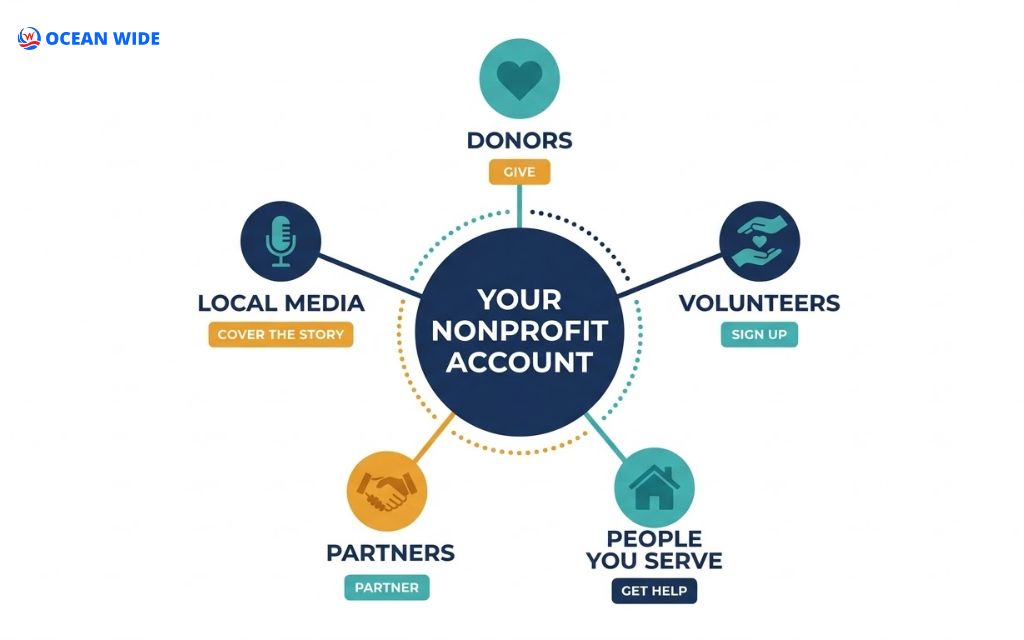
Nonprofit social media marketing differs from business marketing in one way. A shop sells to customers. A charity speaks to 5 groups at once: donors, volunteers, beneficiaries, partners, and local media.
Each group needs its own message and its own next step. A clear nonprofit social media strategy maps those groups to specific calls to action, instead of posting news and hoping for engagement.
Why social media matters for nonprofits, and where it falls short
Social media gives nonprofits low-cost reach, but it also carries limits that shape your plan. Weigh both sides before you write a single post.
6 benefits of social media for nonprofit organizations
Most of your supporters already spend time on these apps. In Pew Research Center’s 2025 survey of 5,022 U.S. adults, 84% said they use YouTube, and YouTube and Facebook ranked as the two most-used platforms. That reach supports 6 outcomes:
- Awareness: Short videos and posts introduce your cause to people outside your mailing list.
- Community: Comment threads and groups give supporters a place to talk with your team and each other.
- Fundraising: Donation links, fundraisers, and giving-day posts turn interest into gifts.
- Volunteer recruitment: Event photos and sign-up links show what a volunteer shift looks like.
- Advocacy: Supporters share action alerts, such as petitions, hearing dates, and policy updates.
- Transparency: Impact updates and behind-the-scenes posts show donors how you use their money.
3 limits every nonprofit should plan for
Social platforms rent you an audience; they do not hand it over. Plan around these 3 limits:
- Organic reach: Feeds rank posts by predicted interest, so many followers never see a given update.
- Platform rules: Features, ad policies, and fundraising tools change with little notice.
- Donor data: Gifts made inside an app often reach you with limited contact details, which weakens follow-up.
That is why your website and email list still carry the donor relationship. Social media opens the conversation, and owned channels keep it going.

How to build a nonprofit social media strategy in 8 steps
To build a nonprofit social media strategy, connect every post to a mission goal, a defined audience, and a measurable action. Most small teams can draft the first version within one planning month.
1. Tie social goals to your mission
Start with 1 primary goal that your board already tracks. Then turn it into a SMART goal: specific, measurable, achievable, relevant, and time-bound.
| Mission goal | Example SMART goal | Primary KPI |
| Awareness | Reach 25,000 local accounts with impact videos by June 30 | Reach and video views |
| Donors | Raise $5,000 from social traffic during GivingTuesday | Donations by source |
| Volunteers | Fill 40 volunteer shifts from Instagram this spring | Sign-ups with UTM source |
| Advocacy | Get 300 supporters to email city council in 2 weeks | Action-form completions |
| Partners | Book 3 corporate volunteer days through LinkedIn this year | Partner inquiries |
2. Define your audiences and simple personas
A persona is a one-paragraph profile of a real supporter type. Write 3 to 4 personas, such as these:
- The monthly donor: Gives $25 a month, reads impact updates, and rarely comments.
- The weekend volunteer: Shares event photos, tags friends, and wants sign-up dates fast.
- The corporate partner: Checks LinkedIn, values impact data, and forwards posts to colleagues.
- The person you serve: Needs clear service hours, eligibility rules, and privacy.
Write each post for 1 persona. Mixed messages blur the call to action.

3. Audit your accounts and study peer nonprofits
An audit shows what already works before you add more work. Export the last 90 days of insights from each account and note 3 things: your top 5 posts, the formats behind them, and the actions they drove.
Next, review 3 to 5 peer nonprofits in your cause area or region. Record their platforms, posting rhythm, content pillars, and calls to action. Look for open gaps, such as a weekly explainer video no one else makes.
Keep the audit in a shared spreadsheet so your board and volunteers see the same baseline. Repeat it every quarter to spot formats that lose steam.
4. Choose platforms with a goal-by-audience matrix
Pick platforms by matching your primary goal to where your personas spend time. In the M+R Benchmarks 2025 study, nearly all participating nonprofits were active on Facebook and Instagram. TikTok audiences grew fastest, with average follower counts up 37% in 2024.
| Platform | Best for | Audience fit | Effort |
| Events, local groups, fundraisers | Wide adult reach across age groups | Medium | |
| Visual impact stories, Reels, donation stickers | Younger and visual-first supporters | Medium | |
| Corporate partners, board recruits, funders | Professionals and grantmakers | Low to medium | |
| YouTube | Explainers, event recaps, long stories | Widest U.S. reach (84% of adults) | High |
| TikTok | Awareness with younger audiences | Adults under 30 | High |
| Threads, Bluesky, or X | News, advocacy, media relations | Journalists and policy watchers | Low to medium |
Start with 1 platform if you have under 3 hours a week. Add a second only after you post on schedule for 90 days.

5. Plan content pillars and a 90-day calendar
Content pillars are 3 to 5 recurring themes that keep posts consistent. Most nonprofits can work with these 5: impact stories, behind-the-scenes work, education, community spotlights, and calls to action.
Map the pillars into a 90-day calendar with the date, platform, format, persona, and goal for each post. Then lock in the fixed dates your donors already watch.
The fourth quarter shows why this matters. GivingTuesday falls on the Tuesday after U.S. Thanksgiving. Colorado charities also plan for Colorado Gives Day, the statewide online giving day that Community First Foundation and FirstBank have presented each December since 2010. Schedule teaser posts 2 weeks before, reminders on the day, and thank-you posts within 48 hours.
6. Set up nonprofit accounts and tools
Register your accounts as a nonprofit before you launch your first campaign. Major platforms run programs for verified charities, including these 4:
- Meta Charitable Giving Tools: Enable donate buttons and fundraisers on Facebook and Instagram. Instagram fundraising requires approval for these tools, an Instagram business account, and a link to your verified Facebook Page.
- YouTube Nonprofit Program: Adds nonprofit features and support through Google for Nonprofits.
- TikTok For Good: Provides a resource hub for nonprofit content, community, and fundraising on TikTok.
- Canva for Nonprofits: Gives eligible organizations design tools for templates and brand kits.
Then clean up each profile. Write a one-line mission statement, add a link to your donation page, and pin your most important post.

7. Write a social media policy and response plan
A social media policy tells staff and volunteers who can post, what needs approval, and how to respond. Keep it to 2 pages and cover 4 areas:
- Access: Who holds admin roles, where passwords live, and how you remove former staff.
- Approval: Which posts need a second reviewer, such as fundraising appeals, policy statements, and crisis updates.
- Consent: Signed photo and story releases before you feature beneficiaries, with extra care for children and sensitive services.
- Response: Reply times, escalation steps, and rules for hiding or reporting comments.
Negative comments test every team. Our guide to social media complaints walks through replies that protect trust.
8. Measure what matters, from engagement to donations
Measure social media by the actions it drives, not by likes alone. Track 1 KPI per funnel stage:
| Funnel stage | KPI | Where to find it |
| Awareness | Reach and video views | Platform insights |
| Engagement | Comments, shares, and saves | Platform insights |
| Conversion | Donations, sign-ups, and form completions | GA4 and your donation platform |
| Retention | Repeat donors and new email subscribers | CRM or email tool |

A nonprofit social media plan based on team capacity
The right nonprofit social media plan depends on hours, not ambition. Choose the column that matches your real weekly time, then scale up only after 3 months on schedule.
| Element | 2 hours a week | 5 hours a week | 10+ hours a week |
| Platforms | 1 | 2 | 3 |
| Posts per week | 2 to 3 | 4 to 6 | 7 to 10 |
| Video | 1 short clip a month | 1 short video a week | 2 to 3 short videos a week |
| Community care | Reply twice a week | Reply daily for 15 minutes | Daily replies and a monthly live Q&A |
| Paid social | None | Boost 1 top post a month | Monthly ad test with a set budget |
| Reporting | Quarterly check | Monthly 1-page report | Monthly dashboard and board summary |
With 2 hours a week, batch a month of posts in one session and schedule them. At The Ocean Wide, we batch-plan monthly content calendars for our small business clients for the same reason: it frees time for replies and timely posts.
A 5-hour week can follow a simple rhythm. Spend 2 hours on Monday batching posts, 15 minutes each weekday on replies, 1 hour on Thursday filming one short video, and 30 minutes on Friday reviewing results. Move unfinished tasks to the next week instead of skipping replies.
Consistency on 1 platform beats occasional posts on 4. Commit to the cadence you can keep for 90 days, then grow.

10 nonprofit social media content ideas that build trust
Content ideas work best when each one ties to a pillar and a call to action. These 10 formats suit small teams:
1. Before-and-after impact stories: Show one person, place, or project and the change your program made.
2. Volunteer spotlights: Feature one volunteer, their role, and why they keep showing up.
3. Day-in-the-life videos: Follow a staff member through a shift in 30 to 60 seconds.
4. Myth-versus-fact posts: Correct one misconception about your cause per post.
5. Stat-plus-question posts: Share one number from your annual report and ask followers to respond.
6. Live Q&A sessions: Host your executive director or a program lead for 20 minutes.
7. Sponsor thank-you posts: Tag local businesses that donated goods, space, or time.
8. Milestone updates: Report progress toward a campaign goal, such as meals served or trees planted.
9. Supporter-generated posts: Invite supporters to share photos with a campaign hashtag.
10. Account takeovers: Let a volunteer or partner run your Stories for one day.
For smartphone video, film in daylight and keep the phone 3 to 4 feet (0.9 to 1.2 meters) from the speaker for clean audio. Add captions and alt text so every supporter can follow, and write multi-word hashtags in CamelCase, such as #ColoradoGivesDay.

Fundraising on social media: what works in 2026
Social media fundraising works when posts make giving simple and the follow-up stays in your hands. Combine these 3 methods.
Native donation tools vs. your own donation page
Native tools keep donors inside the app, while your own page keeps the donor relationship. Compare them before each campaign:
| Factor | Native tools (Facebook and Instagram) | Your donation page |
| Donor effort | A few taps, no new site | One click away, a few more steps |
| Donor data | Limited contact details | Full record in your CRM |
| Branding | Platform layout | Your story, brand, and questions |
| Follow-up | Hard to steward | Thank-you emails and updates |
| Processing | U.S. gifts routed through PayPal Giving Fund | Your own payment processor |
Use native tools for quick, impulse gifts. Send larger campaigns to a fast, mobile-friendly page built by a website design & development team or your fundraising platform.
Peer-to-peer and birthday fundraisers
Peer-to-peer fundraising asks supporters to raise money from their own networks. Facebook birthday fundraisers are the familiar example. Give each fundraiser a ready kit: 3 photos, a short story, a suggested goal, and a thank-you template.

Giving days and matching campaigns
Giving days create urgency because they end at a set hour. Announce any match early, post progress updates during the day, and share the final total with thanks. A match from a local sponsor gives donors a reason to act now. On the day itself, plan 4 to 6 posts: a morning launch, 2 or 3 progress updates, a final-hours reminder, and a next-day thank-you.
Paid social for nonprofits: when boosting makes sense
Boost a post when organic data already proves it works. Paid social then extends a message people engage with, instead of buying reach for a weak post. Use 3 tactics:
- Boost proven posts: Put a small test budget behind your top organic post of the month.
- Retarget site visitors: Show a donation or volunteer ad to people who visited your site in the last 30 days.
- Test one variable: Change only the image, the headline, or the call to action in each test.
Measure cost per sign-up or cost per donation, not cost per like. Our guide to marketing experiments shows how to set up a clean test.
Ads about social issues, such as housing, health care, or immigration, need extra steps on Meta. U.S. advertisers complete ad authorization and add a “Paid for by” disclaimer. For multi-platform campaigns, see our digital advertising service.

7 common nonprofit social media mistakes to avoid
These 7 mistakes drain the limited hours small teams have:
- Posting everywhere: Spreading 3 hours across 5 platforms leaves every account thin.
- Asking without reporting: Back-to-back donation asks without impact updates wear out followers.
- Ignoring comments: Unanswered questions signal that no one is listening.
- Skipping consent: Featuring beneficiaries without a signed release puts people at risk.
- Relying on stock photos: Generic images hide the real people behind your work.
- Measuring likes only: Vanity metrics hide whether posts drive gifts or sign-ups.
- Working without a policy: Shared logins and unclear approvals lead to off-brand posts.

In-house, volunteers, or an agency: who should run your social media?
The best setup depends on your hours, your budget, and how much consistency your goals demand. Compare the 3 options:
| Factor | In-house staff | Volunteers | Agency |
| Cost | Salary or part of a role | Low cash cost, high coordination time | Monthly retainer |
| Control | High | Medium | Shared, with approvals |
| Consistency | Depends on workload | Varies with availability | Set by contract |
| Skills | Deep mission knowledge | Enthusiasm and mixed skills | Strategy, design, video, and ads |
| Best fit | Teams with a comms role | Small, event-driven programs | Campaign seasons or no comms staff |
Outside help makes sense when you see these 4 signs: posts stop during busy seasons, no one reports results, video stays on the to-do list, and ads run without tracking. Social media management for nonprofits often works best as a hybrid. Staff own the stories, while specialists handle planning, production, and reporting.

Social Marketing Service from The Ocean Wide
The Ocean Wide’s Social Marketing Service turns social media for nonprofits into a repeatable system that you can plan, produce, and measure without adding headcount. We are a Denver-based digital agency, and our team runs social media for small and local businesses across Colorado.
Our social marketing work covers 5 areas:
- Strategy: Audience research, platform selection, content pillars, and a KPI roadmap.
- Content creation: Short-form video, graphics, carousels, and on-site photography for impact stories.
- Management: Content calendars, scheduling, and replies to comments and DMs.
- Paid social: Facebook, Instagram, TikTok, and LinkedIn ad campaigns.
- Analytics: Reporting dashboards that tie posts to clicks, sign-ups, and donations.
Every engagement starts with a discovery call about your goals and weekly capacity. Book a free call to see which plan fits your organization.

FAQs about social media for nonprofits
What social media platforms are best for nonprofits?
The best platforms are the ones where your target supporters already spend time. Facebook and Instagram suit most community charities, LinkedIn suits corporate partnerships, and YouTube or TikTok suit video-led awareness.
How often should a nonprofit post on social media?
Post on a schedule you can keep, usually 2 to 6 times a week per platform for small teams. Steady timing matters more than volume.
How can nonprofits raise money on Facebook and Instagram?
Apply for Meta Charitable Giving Tools, then add donate buttons, fundraisers, and Instagram donation stickers. Instagram also requires a business account linked to your verified Facebook Page.
What social media metrics should nonprofits track?
Track 1 metric per stage: reach, engagement, conversions, and retention. Conversions, such as donations and volunteer sign-ups, show real mission impact.
Is social media free for nonprofits?
Accounts are free, but staff time, design tools, and ads cost money. Budget at least the hours in your capacity plan.
How many people should manage a nonprofit’s social media?
One accountable owner is enough for most small nonprofits, with 1 backup for approvals and absences. Larger programs add video, community, and ads roles.
Does a nonprofit need a social media policy?
Yes, any nonprofit with more than 1 person posting needs a written policy. It protects passwords, beneficiary privacy, and your reputation.
Should a nonprofit hire an agency for social media?
Hire an agency when posting, video, or reporting stalls and staff hours cannot cover it. A good partner for social media for nonprofits handles planning, production, and reporting. Your team keeps storytelling and approvals in-house so the voice stays authentic.


